
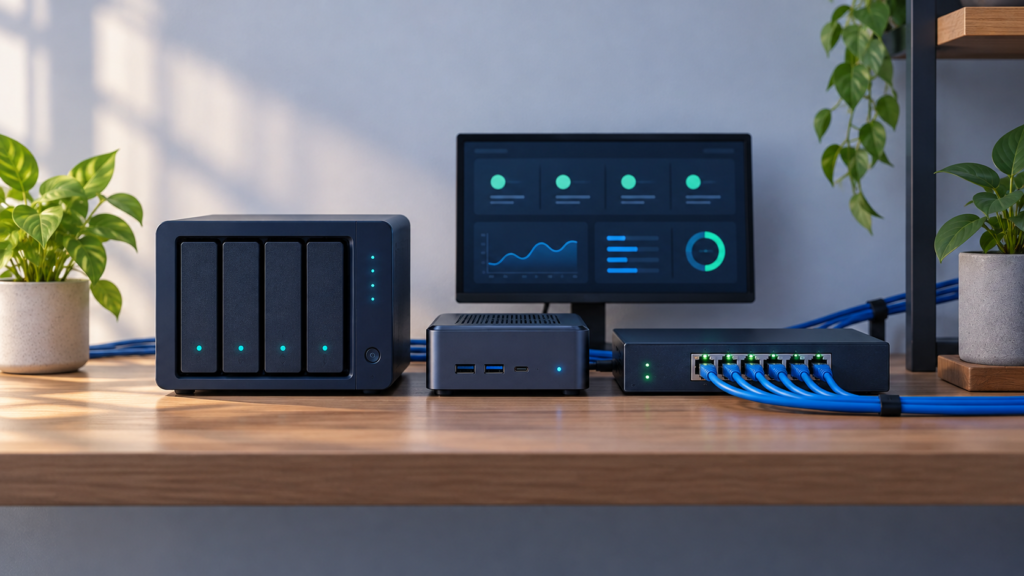
A server doesn’t stay a test environment just because you called it that when you bought it.
My early plan was to keep storage and applications on the NAS, then add another machine for experimentation. Once the Proxmox host ran services I depended on, its role changed. It was production compute. Experimentation needed a separate boundary, not a convenient label.
That shift shaped my approach to home-lab automation: protect what works, make the smallest, useful change, and test the result before moving on. The goal isn’t to automate everything. It is to make the system easier to operate and recover.
Where should you start with home-lab automation?
Start home-lab automation by identifying durable data, protecting it with backups, and defining how you will verify recovery. Then automate repeatable service startup and monitor meaningful outcomes. Keep experiments separate from services you depend on. Add complexity only when it solves a specific, observable problem.
Those priorities became clearer as my lab grew into a platform with storage, playback, requests, automation, and monitoring. Three lessons explain the approach better than a shopping list of tools.
1. Separate the application from the data it serves
My storage system runs Unraid. Production compute runs Proxmox. Their responsibilities are different: NAS owns the durable data; the compute host runs applications that consume it.
The Jellyfin migration made that distinction practical. I moved the media-server application onto the compute host while leaving the media library on the NAS. Application state was copied during a stopped-instance migration and restored in the new guest. The media did not need another authoritative home just because the application moved.
That did not make the migration automatic. The application still needed working storage access, correct library paths, and client validation. The records describe web and app access working while a TV client retained old application state. Clearing that client state was followed by confirmation it worked.
Moving the server and completing the migration were different milestones.
For another build, I would answer these questions before adding automation:
- Where does the authoritative data live?
- Which application settings must survive a rebuild?
- Which storage mounts and permissions does the application depend on?
- Which clients or integrations must be checked after a move?
Separating storage from compute clarifies those responsibilities. It does not eliminate the storage dependency or make the platform highly available. If the NAS is unavailable, applications that consume its data can still lose access.
The broader architecture is described in my home-lab architecture project.
2. A running guest is not a healthy service
One recorded Jellyfin incident exposed a different boundary. The virtualization guest was running, but the Docker application inside it was unhealthy or stopped. The recovery record eventually showed the application starting and its health endpoint returning HTTP 200.
The incident escalated to a host reboot. That is history, not my recommended first troubleshooting step. The useful lesson is the sequence of checks:
Host → guest → Docker → application → health endpoint → actual playback.
Each check answers a different question. A running guest shows the guest is up. It does not prove the container is running, the application can read its media, or a client can play anything.
Google’s SRE guidance draws a similar distinction between inspecting internal signals and testing externally visible behavior. It also recommends keeping alerts focused on symptoms or imminent real problems, not generating noise that interrupts people without helping them act.[3]
What startup automation can and cannot do
Docker Compose can wait for a dependency’s health check before starting a dependent service when depends_on uses condition: service_healthy. Without that condition, startup order alone does not establish readiness.[1]
That is useful, but not a complete recovery system. A container health check does not provide automatic repair by itself. Docker restart policies govern container exit and restart behavior; they don’t prove an application serves users correctly.[2]
I would keep three responsibilities separate:
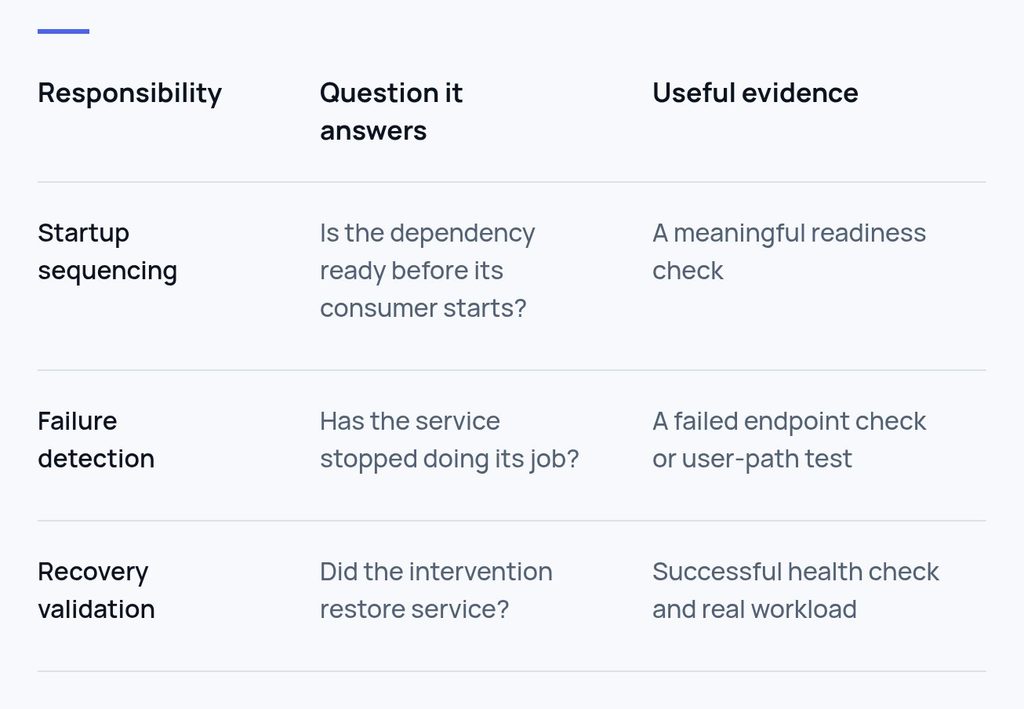
The practical safeguard is to decide what a green status means before trusting it. After a meaningful restart or migration, I want a real user action, not just a green icon.
3. Back up the state you need, then test what you claim
The media platform separates temporary work from durable state. Its automation VM uses a dedicated staging disk for replaceable downloads. That disk was excluded from guest backups, while operating-system and application state remained protected.
The reasoning matters more than disk size: a backup should protect what is needed to recover, not blindly preserve everything a machine touches.
That exclusion depends on the handoff working. Required content must reach durable storage before temporary staging is cleaned. A finished download does not permit deleting files that have not imported successfully.
The build guide records nightly guest backups to the NAS and one temporary guest restore test. It also records off-site backup as selected but not deployed. These facts support a limited claim: one guest restore was documented. They do not prove every application, dataset, or NAS loss has been tested.
A backup stored on the same NAS as other essential data shares that NAS’s failure boundary.
For my next recovery checks, I would record:
- The backup selected and the state it is expected to contain.
- An isolated restore target that cannot overwrite the working service.
- Whether the restored application starts and can use its data.
- A real user action and any missing dependency.
- The outcome, cleanup, and remaining recovery gap.
The schedule should reflect how often data changes and what loss is tolerable. A monthly sample restore can be a starting routine, not a universal standard or substitute for testing after a significant change.
Define automation success at the final handoff
The media workflow reinforced another operating rule: success belongs at the end of the process.
A request can reach a downloader and still fail to become usable content. Import paths, permissions, library refresh, and cleanup each have a job. The September build guide records validated movie and TV workflows, including a corrected TV path-mapping issue. Music automation still requires its own end-to-end acceptance test.
I would not mark music complete because similar services were installed or a different workflow passed.
That distinction appliThat distinction applies beyond a home lab. A report refresh is not complete if the decision-maker receives stale information. A file transfer is not complete if the receiving application cannot use it. The last successful component is not necessarily the final outcome. Write the acceptance condition before the script: what must be true for the person relying on this process?
A reliability worksheet you can use before automating
Copy this worksheet for one service. Start with something important enough to protect, but small enough to understand.
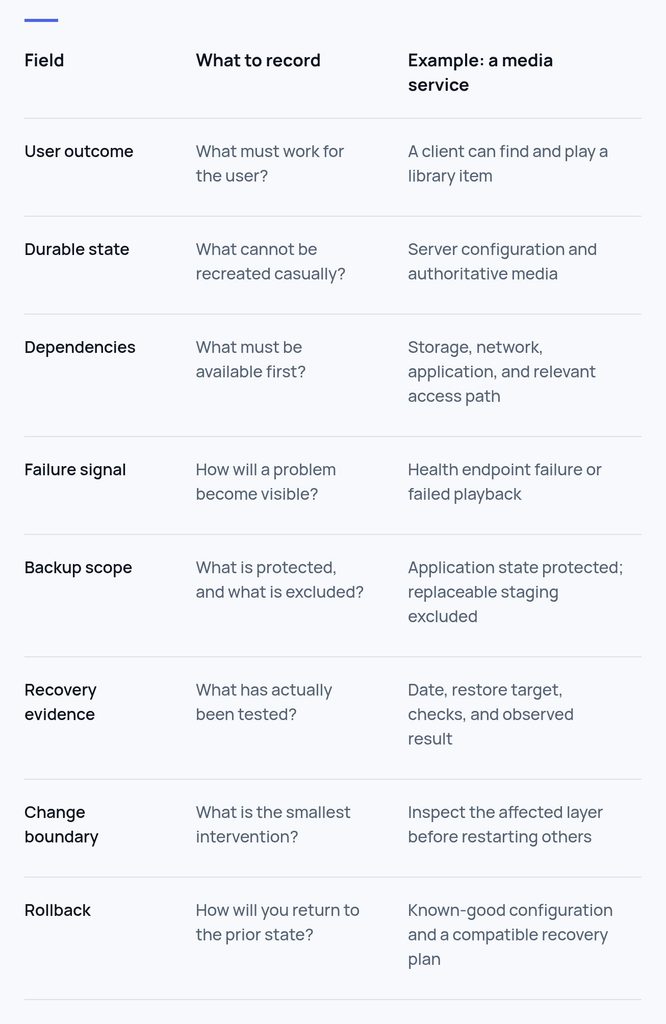
The example is a planning aid, not a claim that every check is deployed or tested in my environment. A blank field helps because it flags unknowns before automation makes them harder to spot.
A practical starting sequence
First: inventory one service
Identify its role, data owner, application state, dependencies, and users. If others rely on it, treat it as production even if it runs in a home lab.
Next: establish protection and a recovery check
Inspect the backup scope. Verify required state is included and exclusions are deliberate. Restore to an isolated target and record exactly what passed. Keep off-site protection and whole-host recovery as separate questions.
Then: automate one repeatable action
Choose a narrow task with a clear outcome. Document its prerequisites, failure behavior, and rollback. Make one change, retest, and record the result. Do not combine a storage move, application update, and access-policy change into one experiment.
Finally: monitor the outcome
Use availability checks alongside resource and platform information needed for diagnosis. In my records, Uptime Kuma, Beszel, and Pulse serve those different monitoring roles. Their presence alone does not prove every failure mode is covered.
For a scheduled job, a completion heartbeat is another possible improvement: the job signals only after its defined success checks pass, and an independent monitor detects a missed signal. This is a recommendation, not a claim about my deployed setup. A heartbeat proves only as much as the preceding checks.
Common questions
Should I automate updates first?
I would establish backup, recovery, and validation procedures first. Updates change a working system. Record the deployed version, review compatibility, and keep a recovery path. An old image alone may not reverse a database migration.
Does separating storage and compute make recovery automatic?
No. It clarifies ownership and lets the application move without duplicating the authoritative library. Recovery still depends on application state, mounts, permissions, networking, and client behavior.
Does a health check automatically restart an unhealthy container?
No. Health reporting and restart behavior are different mechanisms. Readiness conditions can gate dependent startup; restart policies address container exit behavior. Neither replaces a real service test.[1][2]
What should I automate first?
Start with the most consequential unprotected failure mode. For a service holding important state, that often means validating backup and recovery. For an existing protected service, it may mean detecting silent failure. The worksheet helps make that choice explicit.
Build for the next recovery, not just the next feature
The most useful change in my lab was not a particular application. It was becoming more precise about responsibility: storage owns data, compute runs services, temporary work is disposable only after a successful handoff, and a test proves only the scenario it exercised.
That is what I want from automation: less uncertainty and a clearer next step when something breaks.
Start with one service. Protect its state. Define success. Test the path the user takes. Then automate the next repeatable task.
For more context, explore my lab projects and automation with a human override.
A note on these examples
These examples reflect my home-lab experience at the time of writing. Configuration details have been simplified for clarity.
Sources
[1] Docker Docs — Control startup order in Docker Compose
[2] Docker Docs — Start containers automatically
[3] Google SRE Book — Monitoring Distributed Systems
Related reading
More articles are taking shape.